If you searched for “antigravity griil me,” you probably meant Google Antigravity’s /grill-me command.
The spelling is easy to get wrong. The useful idea is harder to miss: before an AI agent starts building, make it question the plan.

*The goal is not to make AI sound clever. The goal is to make your next decision easier.*
Google describes /grill-me as a slash command that asks questions back before implementation so the user and the agent can align on the details of the plan. It appears alongside /goal, /schedule, and /browser in the current Antigravity getting-started documentation.
The important part is not memorising a command. It is building a habit:
Do not ask AI to execute an unclear task. Ask it to expose the decisions first.
This guide explains how to use that habit as an ordinary person, solo professional, creator, teacher, or small-business owner—not only as a software developer.
If you prefer Korean workplace examples, see our related guide, Antigravity /goal and /grill-me for practical AI work. This English article takes a narrower approach: it focuses on the search intent around /grill-me and turns the command into a repeatable planning routine.
목차
- 1 The short answer: what does /grill-me do?
- 2 /grill-me is not a magic skill
- 3 What real examples keep getting right
- 4 Try this today: the interview-first routine
- 5 Three everyday use cases
- 6 When not to use /grill-me
- 7 Make it stick: a seven-minute habit you can repeat
- 8 Final checklist
- 9 Conclusion
- 10 Sources and further reading
The short answer: what does /grill-me do?
/grill-me creates an interview before execution.
Instead of sending this:
Build me a website for my business.you send something like this:
/grill-me

I want to create a one-page website for my weekend photography service.
Before building anything, interview me about the audience, offer, content,
visual direction, technical constraints, and definition of done.
Ask only the questions that would change the plan.
Give me a recommended answer when a decision is difficult.
Do not start building until you produce a short decision brief.
The agent should help uncover questions such as:
- Is the page meant to generate inquiries, collect bookings, or simply show a portfolio?
- Who is the first audience: couples, families, or small businesses?
- What information must be confirmed before a visitor can contact you?
- What can be published publicly, and what should remain private?
- What counts as finished: a visual mockup, a working page, or a deployed URL?
Those questions are not administrative overhead. They are the work that prevents a polished but useless result.
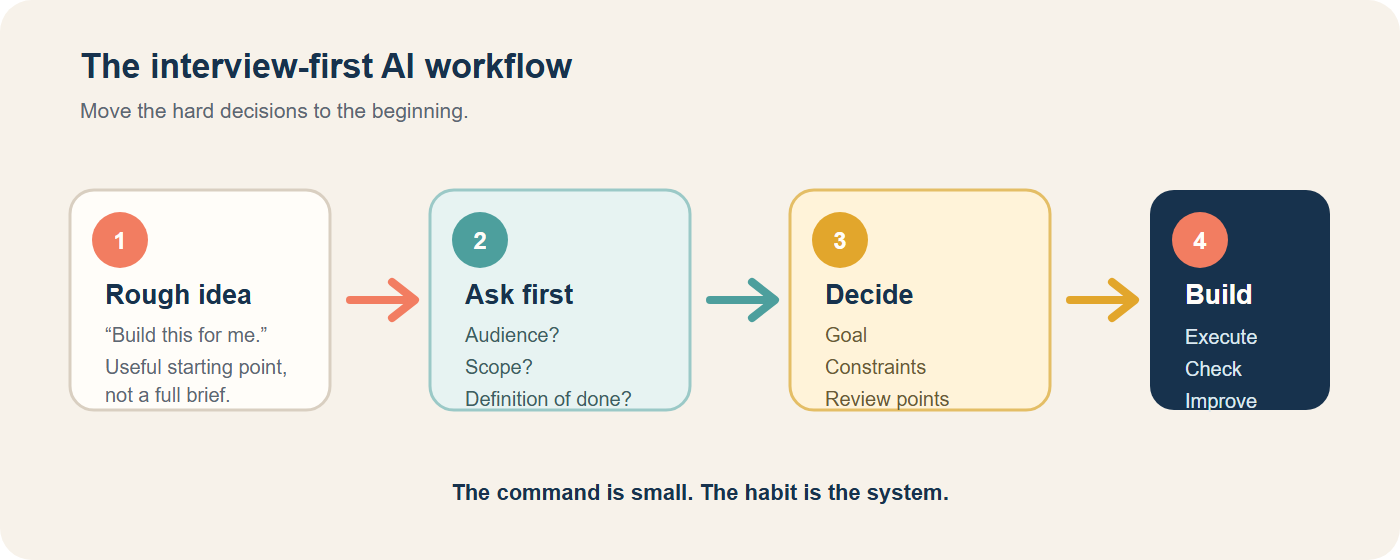
A useful mental model:
/grill-meis the pause button between “I have an idea” and “the agent has started changing things.”
Try it in three minutes
Pick one task you have been postponing. It could be a newsletter, a job application, a personal dashboard, or a small business idea. Give the AI the rough version, then ask only this:
Before you do the work, ask me the five questions that could change the plan.
Ask one question at a time. Tell me why each question matters.
Do not start the task until you summarise the decisions we made.
If the questions are generic, add the files or links the task depends on. If the questions expose a decision you had not considered, the routine is already doing its job.
/grill-me is not a magic skill
Antigravity gives the behaviour a convenient command, but the behaviour is portable.
You can use the same pattern in ChatGPT, Claude, Gemini, a notebook, or a simple document. The reusable pattern has five parts:
- State the outcome you want.
- Tell the AI to find decisions that are still unclear.
- Answer the questions and reject bad assumptions.
- Ask for a decision brief before execution.
- Run the task, then review the result against the brief.
The command is only the trigger. The real improvement comes from moving clarification to the beginning of the workflow.
What real examples keep getting right
The best way to understand /grill-me is to look at the kinds of decisions it is being used to surface.
Example 1: A cloud document-processing pipeline
In a Google Cloud codelab, the starting idea is a serverless document-processing pipeline: files arrive in Cloud Storage, Pub/Sub triggers a processor, Cloud Run simulates OCR, and metadata is stored in BigQuery. The codelab explicitly starts the request with /grill-me and shows follow-up questions about how the infrastructure should be provisioned and managed.
The lesson for a non-engineer is not “learn Cloud Run.” The lesson is that a large request usually hides decisions about:
- where information enters the workflow;
- what event starts the next step;
- where the result is saved;
- what happens when a step fails;
- whether the first version should be a simulation or a live integration.
You can use the same questions for a personal workflow. For example, if you want an AI system to turn meeting notes into follow-up emails, ask where the notes come from, who can see them, what needs human approval, and where the final emails should be saved.
See the Google Cloud codelab example.
This is also a useful safety lesson: the codelab requires a Google Cloud project with billing enabled and includes cleanup steps. A personal user should reproduce the planning pattern with local or mock data first, not copy a cloud deployment blindly.
Example 2: Adding authentication to an API
An independent Antigravity CLI walkthrough uses a deliberately vague request: “add auth to the API.” The follow-up interview forces decisions about the authentication method, whether to reuse an existing users table, and which routes should be protected.
That example is useful even if you never write code. Notice the shape of the questions:
- What kind of solution are we choosing?
- What existing material should we reuse?
- How large is the boundary of the change?
For a job application, the same shape becomes:
- Are we writing a resume, a cover letter, or a portfolio case study?
- Which existing evidence can we use without inventing anything?
- Are we applying for one role or building a reusable base document?
The output improves because the AI is no longer guessing the assignment. Read the full “clarify before you build” walkthrough.
Example 3: A small café creating an AI organisation
In a public Japanese case study, a solo planner used Antigravity to design a small café workflow with four roles: manager, chef, public relations, and administration. The initial request was to create an AI organisation that could coordinate files and store the operating rules in a Skill.md file.
The author used /grill-me to clarify the project purpose, target, required functions, and technical assumptions before allowing the system to create the workflow. The final test used a new café menu item and produced a recipe, promotional copy, cost information, and an allergy-management document.
This is a helpful pattern for an ordinary individual:
One input: a new product idea
    ↓
Clarify the target customer and constraints
    ↓
Create the product brief
    ↓
Create supporting outputs in parallel
    ↓
Human checks price, claims, safety, and tone
The valuable part was not the word “skill.” It was the decision to define the workflow before asking the AI to repeat it.
Read the café case study.
Example 4: The user experience is a planning conversation
Several public walkthroughs describe the same experience in different tools: the user starts with a rough idea, the agent asks one decision at a time, the user corrects the direction, and the agent eventually produces an implementation plan.
One practitioner describes using /grill-me after explaining a project by voice. The command is used to find unclear requirements and design forks before the build begins. Another public video recap lists project permissions, file access, network access, slash commands, browser support, and subagents as part of the wider Antigravity workflow.
The practical conclusion is simple: use the interview to make invisible assumptions visible. Do not treat the first plan the AI produces as a final answer.
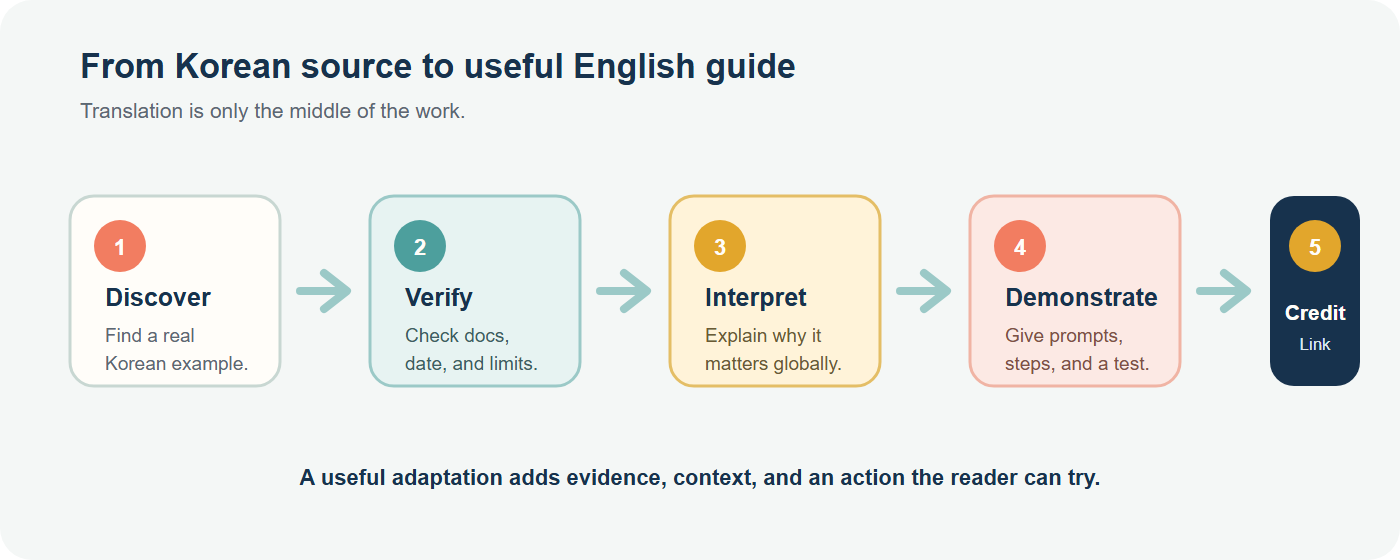
This is also the editorial standard for this article series. A source gives us a lead; it does not give us a finished post. The finished post must add context, evidence, a practical action, and clear credit.
You can review the public Antigravity video referenced in the walkthrough and the accompanying user notes.
Try this today: the interview-first routine
Here is a version you can use for almost any meaningful task.
Step 1: Write a rough brief, not a perfect prompt
Start with what you know. Do not spend twenty minutes trying to write the perfect instruction.
I want to publish a weekly email for people who are starting to use AI at work.
I have three source links and a rough outline.
Help me turn this into a useful email that takes less than five minutes to read.
Step 2: Ask for a decision interview
Use this in Antigravity:
/grill-me

Before drafting the email, interview me about:
- the reader and their immediate problem;
- the one action I want the reader to take;
- which claims need a source;
- what must not be exaggerated;
- the length, tone, and publication format.

Ask no more than six high-impact questions.
For each question, explain what decision it affects and give a recommended option.
Do not draft yet.
For another AI tool, remove the slash command and keep the rest of the instruction.
Step 3: Require a decision brief
After answering the questions, ask for this before execution:
Turn our answers into a decision brief with these headings:

- Goal
- Audience
- Problem to solve
- Scope
- Non-goals
- Inputs and sources
- Constraints
- Definition of done
- Risks requiring human review
- Open questions

Mark every assumption as either confirmed, inferred, or still unknown.
Do not start the final task until I approve this brief.
This is where the conversation becomes reusable knowledge. You can save the brief as BRIEF.md, a Google Doc, or a simple note.
Step 4: Execute with a separate command
Only after the brief is clear should you ask the agent to build, draft, research, or organise the files.
In Antigravity, /goal is the natural next step when you want the agent to run until the specified task is complete. Google describes /goal and /grill-me as different modes: one runs the task, while the other asks questions before implementation. See the official command list.
/goal

Use the approved decision brief as the source of truth.
Create the email draft and a separate fact-check table.
Do not invent a claim, quote, statistic, or product feature.
Stop before sending or publishing anything.
Step 5: Grill the result before you send it
The same habit is useful at the end:
Review this draft as a skeptical editor.
Ask me the five questions most likely to reveal:
- an unsupported claim;
- a missing reader decision;
- a misleading promise;
- a privacy or permission problem;
- a sentence that sounds polished but gives no practical help.

Do not rewrite until you have listed the risks and the evidence needed.
This is not a substitute for human judgment. It is a way to make human judgment easier to apply.
Three everyday use cases
1. Job search
Weak request:
Make my resume better.Interview-first request:
Before editing my resume, ask about the target role, the hiring context,
the evidence I can honestly support, the experiences I want to prioritise,
and anything that must remain confidential.
Separate confirmed facts from suggested wording.
Do not add achievements that are not in my source material.
The result is not just a prettier resume. It is a resume with a clear audience, evidence boundary, and review checklist.
2. A personal project
Weak request:
Help me make an app for tracking my exercise.Ask first:
/grill-me

I want a simple exercise tracker for my own use.
Ask about the smallest useful version, the device I will use,
the data I actually need, privacy, how I will know it is working,
and what should be postponed.
Do not assume that I need accounts, social features, or a cloud database.
This prevents the common failure mode of building a large product around a small personal need.
3. A small business or creator workflow
Weak request:
Create a content system for my small shop.Better request:
/grill-me

I run a small shop and want a repeatable weekly content workflow.
Interview me about the customer, the products, the source material,
the approval point, the channels, the files to create, and the claims
I am not allowed to make.
At the end, propose the smallest workflow I can run every Friday.
The workflow should usually produce a brief, one draft, a source-and-claim checklist, and a human approval step. A reusable skill can come later, after the routine has worked several times.
When not to use /grill-me
Do not turn every tiny request into a formal interview. It is most useful when:
- the task has multiple reasonable interpretations;
- the result will be published, sent, or used to make a decision;
- the agent can change files, run commands, or spend money;
- the request involves private data, permissions, or external systems;
- a wrong assumption would create expensive rework.
For “rename this heading” or “summarise this paragraph,” a direct request is enough.
Make it stick: a seven-minute habit you can repeat
Use this mini-routine before a serious AI task:
- Minute 1 — Brain dump: Write the outcome in plain language.
- Minutes 2–3 — Interview: Ask AI for up to six decisions that could change the plan.
- Minutes 4–5 — Decide: Answer, reject assumptions, and mark unknowns.
- Minute 6 — Brief: Ask AI to summarise the goal, scope, sources, and definition of done.
- Minute 7 — Gate: Approve execution only if the brief is accurate.
Once a week, save the best decision briefs. After several repetitions, you will see which questions come up again and again. Those repeated decisions are good candidates for a checklist, project rule, or SKILL.md file.
That order matters:
First build the habit. Then record the pattern. Only then automate the pattern.
Final checklist
Before asking an AI agent to act, check:
- [ ] Is the desired outcome clear?
- [ ] Is the audience named?
- [ ] Are the source materials identified?
- [ ] Are the non-goals explicit?
- [ ] Have I asked the AI to expose decisions before execution?
- [ ] Did I separate confirmed facts from assumptions?
- [ ] Is there a human review point before publishing, sending, or deploying?
- [ ] Did I keep private or sensitive information out of the prompt?
Conclusion
Google Antigravity’s /grill-me is useful because it changes the moment when clarification happens. Instead of discovering missing requirements after the AI has already built something, you discover them before the first serious action.
But the long-term value is not the slash command itself. The value is a repeatable working habit:
- explain the outcome;
- invite difficult questions;
- make decisions visible;
- record the brief;
- execute;
- review before release.
If you searched for “antigravity griil me,” start with the official spelling /grill-me. Then use the idea beyond Antigravity: whenever a task is ambiguous, ask the AI to interview you before it starts.
Sources and further reading
- Google Antigravity: Getting Started and slash commands
- Google Antigravity 2.0 announcement
- Google Cloud Codelab: Build and Deploy to Google Cloud with Antigravity
- Google Codelab: Building with Google Antigravity
- Neurals: <code>/grill-me</code>, clarify before you build
- Deep森呼吸: A café AI organisation built with Antigravity 2.0
- LiuK: Antigravity 2.0 notes and the embedded video walkthrough
- Referenced YouTube walkthrough
*Product features, command availability, models, permissions, and pricing can change. Check the official documentation before relying on a feature in a real workflow.*