If an AI tool wrote your first draft, the fastest way to make the finished article sound human is not to run it through a “humanizer.” It is to put your own decisions, evidence, examples, and limits back into the document.
That distinction matters. A synonym replacer can change the surface of a paragraph while leaving the same generic ideas underneath. A detector score can also distract you from the more important questions: Is the article useful? Can a reader verify it? Does it contain a point of view that came from a real person?
This guide shows a practical, open-source workflow for editing AI-assisted writing. It uses local or self-hostable tools for grammar, style, consistency, and readability. The goal is not to disguise authorship or bypass an AI detector. The goal is to turn a vague machine draft into a useful article that carries your responsibility as the author.
목차
- 1 The short answer: what makes AI-assisted writing feel human?
- 2 Why “humanizer” tools are the wrong starting point
- 3 The open-source editing stack
- 3.1 1. Harper: a fast, offline English grammar checker
- 3.2 2. LanguageTool: multilingual grammar and style review
- 3.3 3. Vale: a local style guide that remembers your standards
- 3.4 4. proselint: a second opinion on editorial habits
- 3.5 5. textstat: measure readability without pretending to measure quality
- 3.6 6. Ollama: a private local model for questions, not fake experience
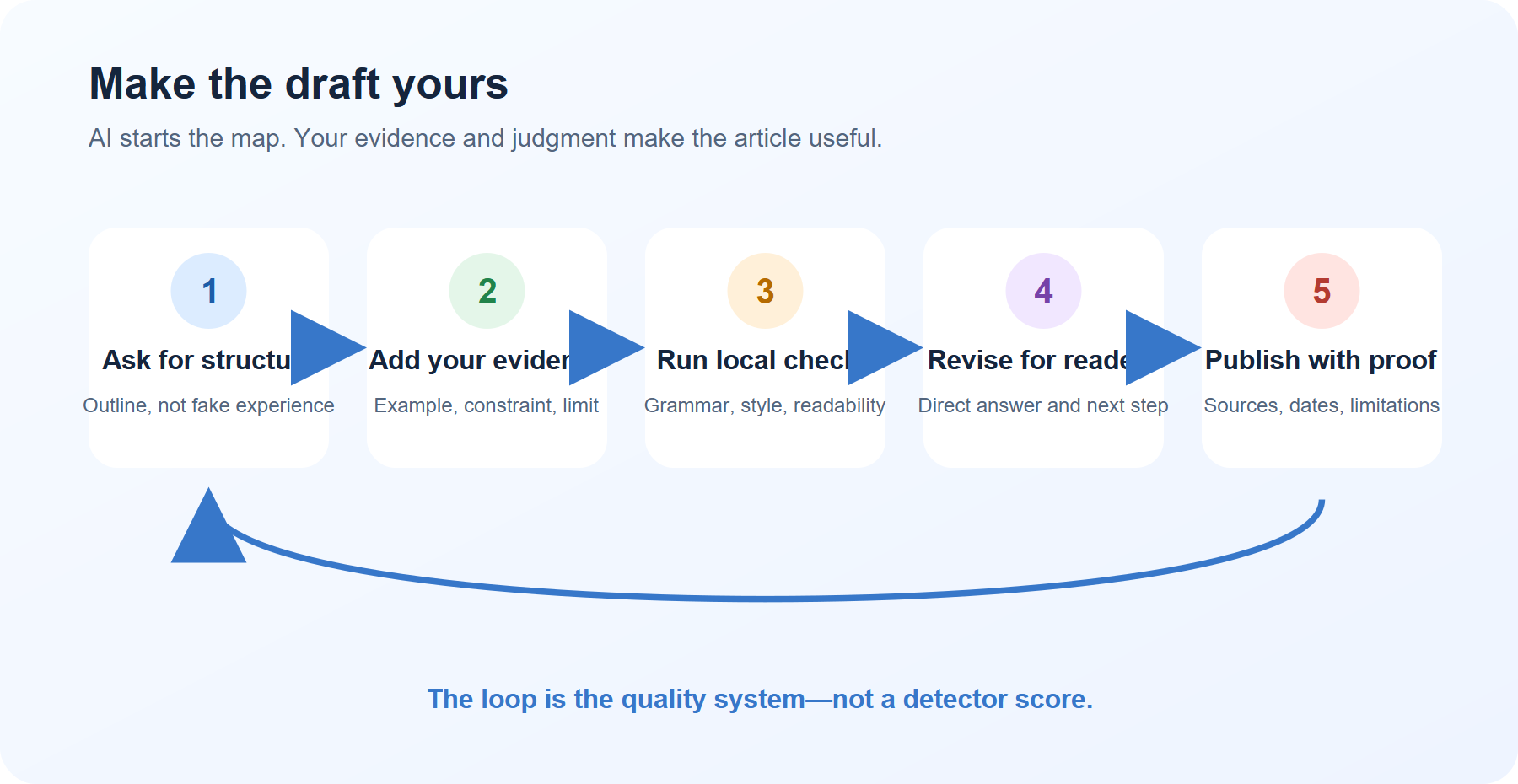
- 4 A 20-minute workflow you can repeat
- 5 Before-and-after example
- 6 What not to automate
- 7 A simple tool-choice table
- 8 Final checklist: publish the author, not the draft
- 9 The real advantage of open-source editing tools
- 10 Sources and project links
The short answer: what makes AI-assisted writing feel human?
Human-sounding writing usually contains decisions that a generic model cannot know without your input:
- a specific reader and situation
- a concrete example with a real constraint
- a reason for choosing one option over another
- a sentence that admits uncertainty or a limitation
- an observation about what happened when someone tried the method
- a clear next action for the reader
Grammar tools can help you find awkward sentences. Local language models can help you compare versions. Neither tool can honestly invent your experience for you.
Use AI to create a map. Use your own judgment to decide where the road actually goes.
Why “humanizer” tools are the wrong starting point
Many tools promise to make AI writing “undetectable” by changing word choice, sentence length, or punctuation. That approach has four problems.
1. It changes the surface, not the value
Replacing “utilize” with “use” may improve a sentence. Replacing every sentence with a different synonym does not add evidence, expertise, or usefulness.
2. It can damage accuracy
Aggressive rewriting may change a technical condition, soften a warning, or introduce a claim you never checked. This is especially risky in finance, health, law, software instructions, and product reviews.
3. It can erase your voice
Your voice is not a list of unusual words. It is the pattern of questions you ask, the trade-offs you notice, and the examples you choose. A tool that rewrites everything can remove exactly what makes the article yours.
4. It does not solve the publishing problem
Google’s guidance on generative AI focuses on content that provides value to people. Google warns that generating many pages without adding value may fall under scaled content abuse. The safer publishing question is therefore not “Can a detector tell?” but “What did the author add that a generic answer did not?”
Read Google’s guidance on generative AI content and Google’s people-first content guidance before building a high-volume AI writing workflow.
The open-source editing stack
You do not need every tool. Start with one grammar checker, one style checker, and one method for measuring readability.
1. Harper: a fast, offline English grammar checker
Harper is an open-source, Rust-powered grammar checker designed to work offline. Its repository describes it as privacy-first and currently focused on English. It can be useful when a draft contains awkward agreement, punctuation, or common usage problems but you do not want to upload the document to a cloud editor.
Use Harper for:
- spelling and grammar checks
- quick sentence-level suggestions
- private editing of unpublished drafts
- Markdown or editor-based writing workflows
Do not use Harper as an automatic rewrite button. Read each suggestion and decide whether it fits your meaning.
2. LanguageTool: multilingual grammar and style review
LanguageTool is open-source proofreading software for English and many other languages. Its core is available under the LGPL 2.1 or later, and the project documents self-hosted and command-line options.
LanguageTool is a good choice when you write in more than one language or want a broader grammar and style check. It can catch errors that a basic spell checker misses, but its suggestions are still suggestions. A correct sentence can be wrong for your audience, and a technically acceptable sentence can still sound unlike you.
Use it after you have finished the argument, not before. Otherwise you may spend time polishing paragraphs that you later delete.
3. Vale: a local style guide that remembers your standards
Vale is a markup-aware prose linter. It can inspect Markdown, headings, lists, and table cells while skipping code spans and URLs. Most importantly, Vale does not decide what “good writing” means for you. You configure the rules.
That makes it especially useful for a blog or team that wants consistent editorial habits:
- avoid vague words such as “easy,” “powerful,” or “seamless” unless you explain them
- replace internal jargon with a reader-facing term
- flag marketing claims that need evidence
- keep product names and capitalization consistent
- remind yourself to include a limitation or source section
A minimal .vale.ini file might look like this:
StylesPath = styles
MinAlertLevel = suggestion

[*.md]
BasedOnStyles = Vale
Run the checker against a Markdown draft:
vale article.mdThe important habit is not fixing every warning. It is deciding which warnings represent your editorial standard.
4. proselint: a second opinion on editorial habits
proselint is a command-line linter for English prose. It collects advice about common writing habits, clichés, and usage issues from a range of editorial traditions.
It is useful as a red-team pass:
pip install proselint
proselint article.md
Treat the output as an editorial conversation, not a law. Good writing sometimes uses a cliché deliberately. A warning is valuable when it makes you reconsider a sentence; it is not automatically a reason to change it.
5. textstat: measure readability without pretending to measure quality
textstat is a Python library for readability, complexity, and grade-level statistics. It cannot tell you whether an article is original or useful. It can tell you when a supposedly simple guide has become difficult to read.
For example:
import textstat

text = open("article.txt", encoding="utf-8").read()

print("Reading ease:", textstat.flesch_reading_ease(text))
print("Grade level:", textstat.flesch_kincaid_grade(text))
print("Sentences:", textstat.sentence_count(text))
Use the numbers comparatively. If your first draft has short, direct sentences and your final draft suddenly becomes dense and abstract, that is a signal to review—not a target score to chase.
6. Ollama: a private local model for questions, not fake experience
Ollama lets you run supported open-weight models locally. The runtime and the model are separate decisions: check the license, hardware requirements, and privacy implications of each model you download.
A local model can help you ask better questions about a draft:
You are an exacting editor, not a ghostwriter.

Read the article below and return four separate lists:
1. Generic claims that need evidence
2. Sentences that sound abstract or interchangeable
3. Places where a real example would help
4. Claims that may have changed and need a source/date check

Do not rewrite the article.
Do not invent personal experience.
For each item, ask me one question that would help me supply the missing detail.
This is a much safer use of a local model than asking it to “make the text undetectable.” The first prompt gives you editorial work to do. The second encourages surface-level disguise.
A 20-minute workflow you can repeat
Here is a small routine for a normal blog post.
Minutes 0–3: write the reader’s decision
Before opening an AI tool, complete this sentence:
After reading this article, the reader will be able to ______.
If you cannot complete it with a visible action, the topic may still be too broad.
Bad outcome: “The reader will understand AI writing.”
Better outcome: “The reader will run a local grammar check, identify three generic claims, and add one verified example before publishing.”
Minutes 3–7: let AI build a rough structure
Ask AI for an outline, not a finished personal story:
Create a practical outline for [reader] who wants to [outcome].

Include:
- the direct answer in the opening
- a decision table
- one reproducible workflow
- common failure modes
- what the reader must verify independently

Do not invent personal experience, test results, quotes, or sources.
Mark any claim that requires current verification as [CHECK].
The output is a scaffold. It is not yet your article.
Minutes 7–12: add three evidence blocks yourself
Replace generic paragraphs with three kinds of evidence:
- A real constraint — What device, time limit, budget, skill level, or privacy requirement changes the recommendation?
- A visible example — What did the input look like, and what did the reader do next?
- A boundary — When should the reader not use this method?
If you do not have a real example, label it as an example. Never turn a hypothetical workflow into a claimed personal result.
Minutes 12–16: run local checks
Run Vale or proselint for style, Harper or LanguageTool for language, and textstat for a rough readability comparison. Keep a short change log:
Removed: three generic claims about “saving time”
Added: one source link and one 10-minute reader exercise
Verified: tool license and current installation path
Still open: whether the model supports my laptop without slow responses
That change log is more valuable than a detector score because it records what you actually improved.
Minutes 16–20: do the human pass aloud
Read the introduction and conclusion out loud. Ask:
- Would I say this sentence to a real reader?
- Does the first paragraph answer the search intent?
- Are the examples specific enough to reproduce?
- Have I separated facts, interpretation, and recommendation?
- Is there a source for every time-sensitive or technical claim?
- Did I leave a clear limit instead of promising too much?
Only after this pass should you consider the article ready for another person to review.
Before-and-after example
Here is the kind of change that matters more than synonym replacement.
Generic AI sentence
AI writing tools can help you create high-quality content quickly and efficiently.
Human-led revision
Use an AI tool to produce the first outline, then spend five minutes adding the constraint the model could not know: whether your reader has a slow laptop, a private document, or only ten minutes before a meeting. That detail changes which tool and workflow you should recommend.
The second version is not “human” because it uses unusual vocabulary. It is better because it makes a decision, names constraints, and gives the reader a next step.
What not to automate
Keep these decisions with a human:
- whether a claim is true
- whether a source actually supports the claim
- whether a personal example is real or hypothetical
- whether a recommendation is appropriate for the reader
- whether a privacy or security trade-off is acceptable
- whether a sentence still reflects what you mean
You can automate detection of a missing source. You should not automate the invention of a source.
You can automate a reminder to add a limitation. You should not automate a fake limitation that no one tested.
You can run a local rewrite for clarity. You should not publish a rewrite you did not read.
A simple tool-choice table
| Your problem | Start with | Why |
|---|---|---|
| English grammar and privacy | Harper | Offline, English-focused grammar feedback |
| Multiple languages | LanguageTool | Broad language coverage and self-hosting options |
| Repeated house-style problems | Vale | Custom rules for Markdown and editorial standards |
| Clichés and prose habits | proselint | A second editorial opinion from the command line |
| Dense or inconsistent reading level | textstat | Comparable readability measurements |
| Asking questions about a private draft | Ollama | Local model workflow, with model-license checks |
The strongest stack is often just Vale plus one language checker. Adding six tools does not automatically make a weak article useful.
Before publishing AI-assisted writing, confirm:
- [ ] The opening gives the reader a direct answer.
- [ ] The article contains at least one decision that came from the author.
- [ ] Examples are clearly labelled as real, observed, or hypothetical.
- [ ] Time-sensitive facts have a date and an authoritative source.
- [ ] The article includes a reproducible reader action.
- [ ] Claims about tools match the current official documentation or repository.
- [ ] A local checker has reviewed grammar and style, but no tool was accepted blindly.
- [ ] The author has read the final version from beginning to end.
- [ ] The article explains a limitation or a case where the method should not be used.
- [ ] The final text is useful even if nobody ever asks whether AI helped create it.
The real advantage of open-source editing tools
The value of open-source tools is not that they give you a magic “human” button. Their value is that they make the editing process inspectable.
You can see the rules. You can run some checks locally. You can change the style guide. You can keep a draft on your own machine when the document is sensitive. Most importantly, you can separate mechanical feedback from authorship.
Let AI help you start. Let open-source tools help you inspect. Let your own evidence and judgment decide what deserves to be published.
Sources and project links
- Google Search: Guidance on using generative AI content
- Google Search: Creating helpful, reliable, people-first content
- Harper on GitHub
- LanguageTool on GitHub
- Vale on GitHub
- proselint on GitHub
- textstat on GitHub
- Ollama on GitHub
*Editorial note: This article recommends an authorship-first editing workflow. It does not promise that any tool can predict or defeat an AI detector, and it does not treat a detector score as evidence of quality.*